The name “Black October” took hold among security researchers the week of October 19, amid a run of serious security flaws that had been surfacing since mid-October. Many were found with the help of AI models, some had gone unnoticed for a decade or more, and all of those below have now been fixed:
- PHP: PHP2Shell is a pair of flaws in PHP, the programming language behind WordPress and many other websites. The security firm Calif first found the vulnerability class on August 11 while working in OpenAI’s Patch the Planet program (according to OpenAI’s Clint Gibler, quoted by TechTarget), and Wiz Research later found the bug independently with Google’s Gemini 4 Argon and OpenAI’s GPT-5.6 Sol. The vulnerable code was more than a decade old, and after PHP fixed it on October 21, the US Cybersecurity and Infrastructure Security Agency (CISA) confirmed on October 26 that attackers were exploiting it.
- Brotli: OpenAI’s Codex Security reported a flaw in Brotli, Google’s widely used library for compressing Web pages and other data, that could let malicious compressed data run code. Google released a fixed Brotli 1.2.1 on October 21, the same day Node.js fixed its built-in copy (Node.js runs many Web servers and apps), and CISA added the flaw to its list of actively exploited bugs on October 27.
- Chrome: On October 27, Anthropic’s Frontier Red Team reported that an unreleased Claude model had found 62 Chrome flaws, all in Google’s two most severe categories, and had chained four of them into an attack that ran code on a Mac within seconds of a Web page loading. Anthropic says Google has fixed all 62 as of Chrome 156, though the fixes arrived across several Chrome 156 builds, so the earliest one isn’t enough.
- Safari: The same Anthropic model built an attack in which a malicious Web page could read data from other sites you’re signed in to, such as your email or bank account. Anthropic says Apple acknowledged the report the day it arrived, and The Hacker News reports that the fix shipped in Apple’s June 29 updates.
- Firefox: Mozilla’s Firefox 159, released October 27, fixed 167 security flaws, and Mozilla credits 34 of them to OpenAI’s Codex Security and 7 more to an OpenAI researcher.
- Windows and Office: Microsoft fixed a record 1,411 flaws in its October 13 updates, a jump that BleepingComputer and Infosecurity Magazine attribute to Microsoft’s own use of AI to find and fix bugs.
- Linux: Anthropic says its model also found a flaw that would let an attacker take over Linux servers that use a networking feature called multipath TCP, with no password and no action by anyone on the server. Linux developers have patched every maintained version of the Linux kernel, but each server still needs its distribution’s kernel update and a restart.
Many of these finds came from AI companies’ own security teams or from researchers working with them, and Apple’s security notes show the same pattern. Its notes for iOS 27, released September 14, credit two fixes to “Calif.io in collaboration with Claude and Anthropic Research,” and its June 29 updates credit a Safari fix to “Milad Nasr and Nicholas Carlini with Claude, Anthropic.” In iOS 27.2 and macOS 27.2 Golden Gate, at least five fixes for WebKit, the engine behind Safari, credit OpenAI’s Codex Security, Anthropic Research, or both.
You may wonder what all this means for your Mac, iPhone, and iPad. On October 26, Apple shipped security updates for macOS 27.2 Golden Gate, macOS 26.7.2 Tahoe, and macOS 15.8.2 Sequoia, along with iOS and iPadOS 27.2, 26.7.2, and 18.7.11. Install them now if you haven’t already.
If you use Chrome or Firefox on a Mac, make sure you have Chrome 156.0.8078.79 or later (released October 29) and Firefox 159.0.1 or later (released November 3). To check, choose Chrome > About Google Chrome or Firefox > About Firefox, which also downloads any available update, and then relaunch the browser when asked. (Chrome and Firefox on an iPhone or iPad use Apple’s WebKit engine, so the iOS and iPadOS updates cover them.)
If your business also has Windows PCs, make sure they’ve installed Microsoft’s October updates (check in Settings > Windows Update). The PHP, Brotli, and Linux flaws sit in server software, not on your devices, but if you installed Node.js or PHP on a Mac yourself, update those too (if you used Homebrew, run brew upgrade in Terminal). Then work through the steps below, because experts expect more weeks like this one.
Why Experts Expect More
On May 1, Ollie Whitehouse, chief technology officer of the UK’s National Cyber Security Centre (NCSC), predicted a “patch wave” because AI in skilled hands can exploit decades of “technical debt” at scale.
On October 22, Jason Clinton, Anthropic’s deputy chief information security officer, posted on X that things will get “a lot worse” before they get better, adding, “we need to hold on for ~18 months,” CNBC reported.
The next day, Chris Krebs, a former director of CISA, told CNBC that smaller companies should “constantly” scan for flaws, deploy patches as fast as possible, or take legacy systems offline. If your business has a website, a server, or network equipment that nobody has looked at in years, that advice applies to you.
Kevin Roose, co-host of NPR’s Machine Gods podcast, said on October 24 that security people expect “every week is going to feel like a new crisis” for the next year or two. But he added, “I don’t think it’s time to panic for most people.”
Australian Web security expert Troy Hunt told ABC News to expect “elevated instances of the data breaches that we’re already seeing every day.” A faster pace makes Apple’s updates matter more, and more breaches mean more leaked passwords, so your accounts need attention too.
Most of the steps below take only a few minutes.
Let Your Apple Devices Update Themselves
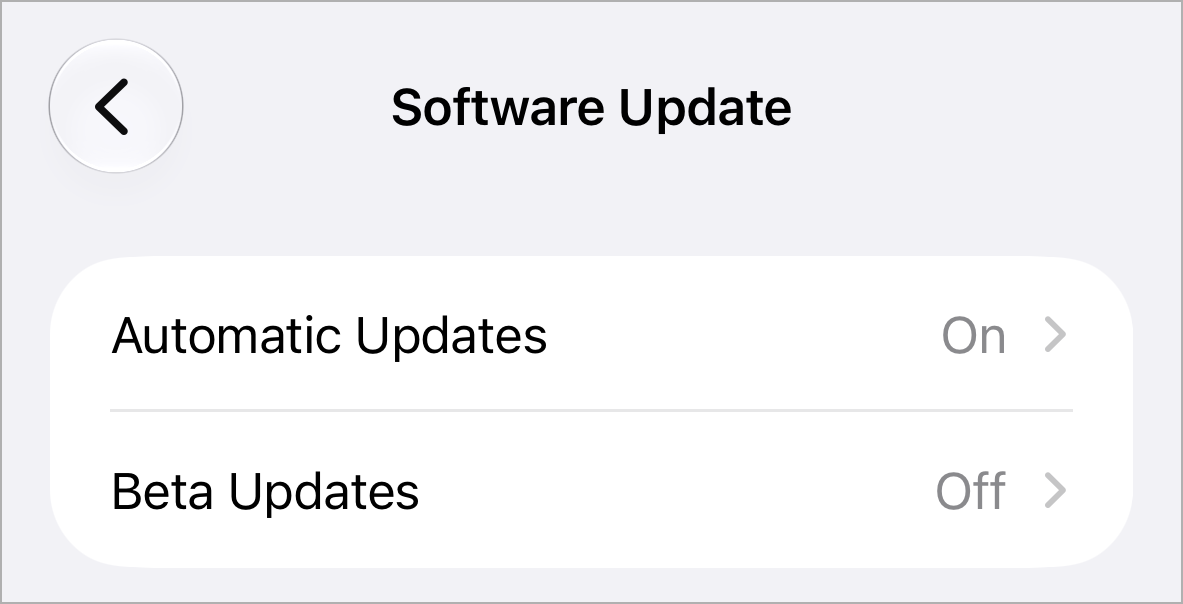
On an iPhone or iPad, turn on Automatically Install in Settings > General > Software Update > Automatic Updates (updates install overnight while it’s charging on Wi-Fi).
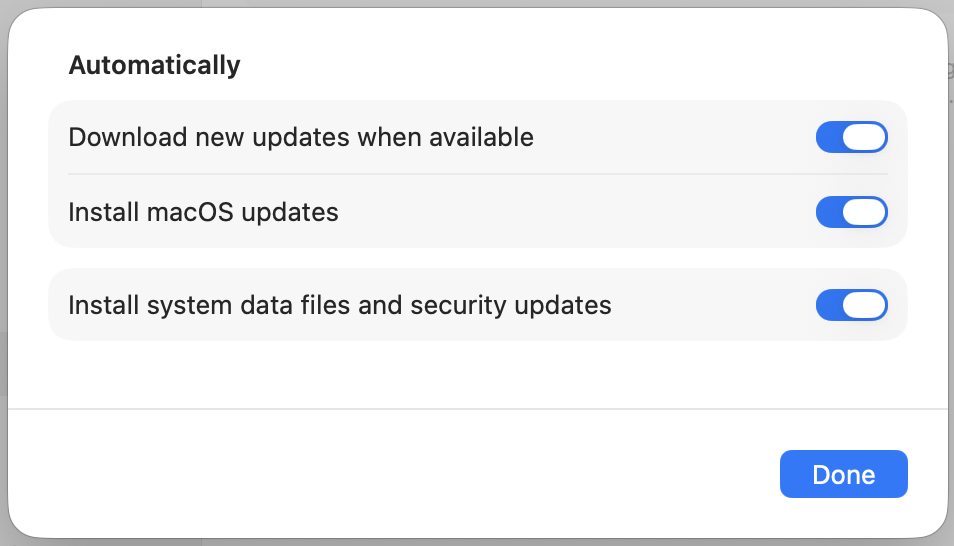
On a Mac, open System Settings > General > Software Update, click the More Info button next to Automatic Updates, and turn on every option, including security updates and system data files.
Also turn on Automatically Install in Settings > Privacy & Security > Background Security Improvements (System Settings > Privacy & Security > Background Security Improvements on a Mac). It delivers smaller fixes for Safari, WebKit, and system libraries between regular updates (iOS 26.1, iPadOS 26.1, and macOS 26.1 or later).
Update Everything Else on Your Network
The NCSC recommends automatic updates “including for embedded devices,” such as routers, network storage devices, printers, and cameras. If a device’s app or Web admin page offers automatic firmware updates, turn them on.
The FBI’s April 7 router warning also says to change default usernames and passwords and turn off remote management from the Internet.
Switch to Passkeys, Starting with Email
The NCSC said on April 23 that passkeys should be the “first choice of login.” They resist phishing and can’t be reused or guessed, so a breach at one site doesn’t expose your other accounts. When a site offers a passkey, accept it, starting with your email account, since whoever controls it can reset many of your other passwords.
Apple’s Passwords app (iOS 18, iPadOS 18, macOS 15 Sequoia, or later) stores passkeys if AutoFill Passwords and Passkeys is on in Settings > General > AutoFill & Passwords. It syncs them to your other devices if iCloud Keychain is on in Settings > [your name] > iCloud > Passwords and Keychain (on a Mac, find both settings in System Settings).
Use Two-Factor Authentication Everywhere Else
Where passkeys aren’t offered, the NCSC’s fallback is two-step verification plus a password manager, and CISA lists both among its four core steps. Most Apple Accounts already use two-factor authentication, but confirm in Settings > [your name] > Sign-In & Security (System Settings > [your name] > Sign-In & Security on a Mac).
The Passwords app can also generate verification codes, so you don’t need to rely on text messages.
Be Wary of Unexpected Requests
CISA puts avoiding phishing scams first on that list, and ABC’s advice after PHP2Shell was to be “extra wary of unexpected prompts to log in or download something, even on sites you trust.”
If an email, text, or call says an account has a problem, don’t follow its link or call the number it gives—go to the site or app yourself. Also watch your card and bank statements over the coming weeks.
Turn On Stolen Device Protection
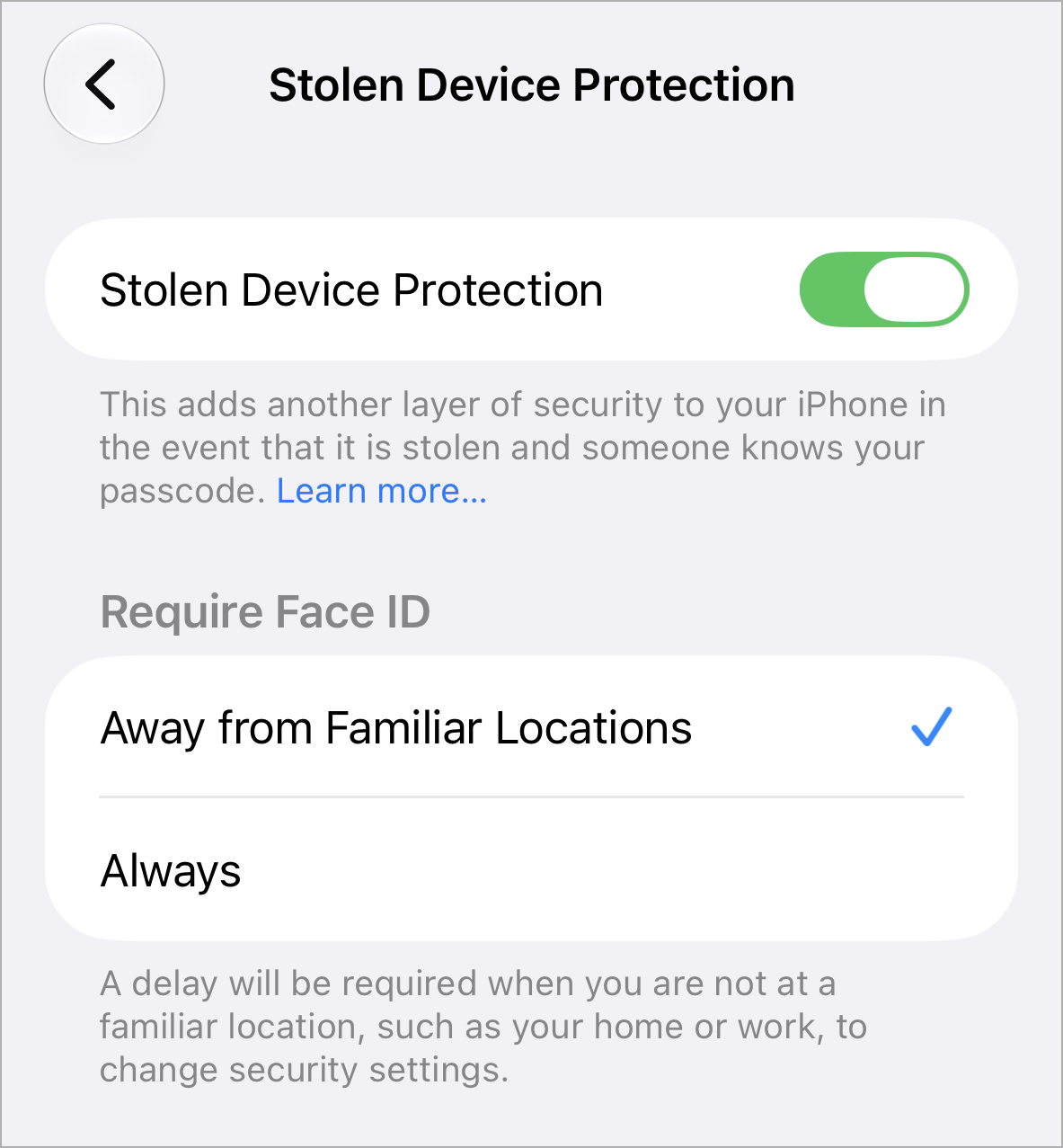
With this iPhone feature (iOS 17.3 or later), a thief who learns your passcode still needs your Face ID or Touch ID to use your saved passwords away from familiar places, where changing your Apple Account password also requires an hour’s delay. It may already be on, so check Settings > Face ID & Passcode > Stolen Device Protection (Touch ID & Passcode on iPhones with Touch ID).
Set Up Account Recovery Now
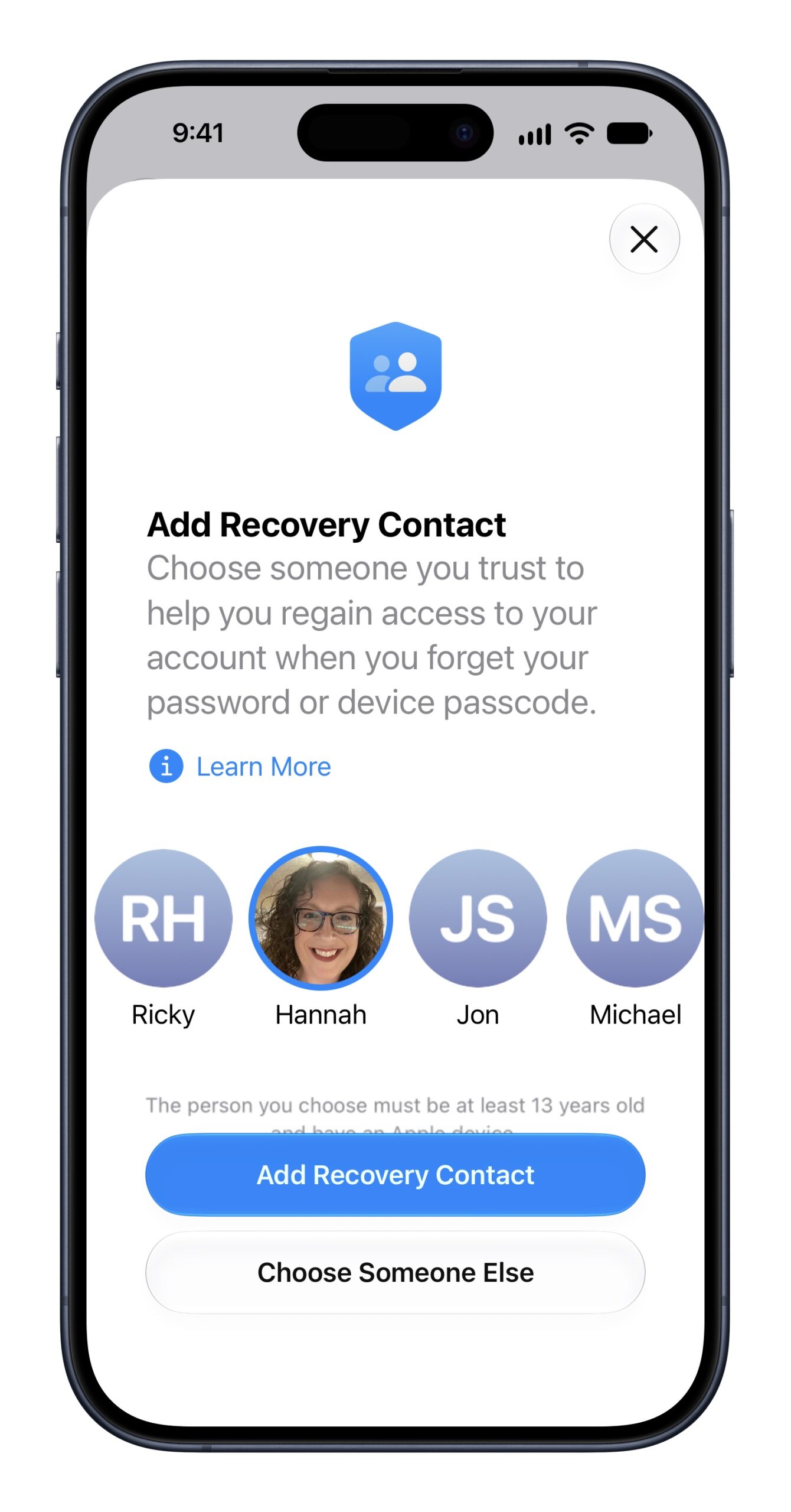
A recovery contact can get you a code if you’re locked out of your Apple Account but can’t access it. The contact needs iOS 15, iPadOS 15, or macOS 12 Monterey or later, with iMessage on. Add one in Settings > [your name] > Sign-In & Security > Recovery Contacts (System Settings > [your name] > Sign-In & Security > Recovery Contacts on a Mac).
Apple’s optional recovery key is riskier, since it turns off standard account recovery and losing it can lock you out permanently. If you create one, print it and store it outside Passwords, Notes, and iCloud Drive.
Keep Backups You’ve Tested
Make sure iCloud Backup is on in Settings > [your name] > iCloud > iCloud Backup. Apple gives you 5 GB of iCloud storage free, but that space is shared with iCloud Photos and iCloud Drive, so it’s seldom enough for a full backup, and you’ll probably need to buy more.
On a Mac, set up Time Machine in System Settings > General > Time Machine with an external drive, ideally at least twice the size of the Mac’s storage. Occasionally, restore a file to confirm the backup works.
Skip Lockdown Mode Unless You’re a Target
Apple built Lockdown Mode for the very few people at risk of sophisticated spyware, and it restricts Messages, FaceTime, and Web browsing. If that’s you, turn it on in Settings > Privacy & Security > Lockdown Mode (System Settings > Privacy & Security > Lockdown Mode on a Mac).
Get PHP Updated on Your Website
If a hosting company manages your site, ask it to confirm that the server runs PHP 8.5.12, 8.4.27, 8.3.36, or 8.2.35 (or a later release in the same branch). Also ask whether it has turned off session.upload_progress.enabled, which PHP recommended on October 23 to block a remaining attack path until its next regular release, which hadn’t shipped as of November 3.
If you or an IT provider runs the server, make those changes directly, and install your Linux distribution’s latest kernel update and restart the server, too. On October 28, CISA added a Linux kernel flaw (CVE-2026-46300) to its list of actively exploited bugs, warning that attackers can chain it with PHP2Shell to run commands as root. On Windows servers, install PHP’s October 26 rebuilds (8.5.12-1, 8.4.27-1, 8.3.36-1, or 8.2.35-1), which also fix the Brotli flaw.
PHP 8.1 and older are past end of life, and the PHP project posted only emergency source patches for 7.4, 8.0, and 8.1 (some Linux distributions provide their own fixes). If your site runs PHP 8.2 (security fixes end December 31, 2026) or older, plan a move to PHP 8.3 or later.
If a Device Can’t Update
The NCSC advises replacing end-of-life technology, and the FBI urges upgrading end-of-support routers, because flaws found in them going forward won’t be fixed.
Apple’s October 26 updates covered Macs running macOS 15 Sequoia or later and iPhones from the iPhone XS on. The last macOS 14 Sonoma update was 14.8.9 on August 6. If a Mac on Sonoma can run a newer version of macOS, upgrade it; if it can’t, plan to replace it, and until then, keep banking and email off it.
The iPhone 8, iPhone 8 Plus, and iPhone X last got a fix with iOS 16.7.16 on May 11. Older iPads stopped the same day, with iPadOS 16.7.16 for the fifth-generation iPad, 9.7-inch iPad Pro, and first-generation 12.9-inch iPad Pro, and iPadOS 17.7.11 for the sixth-generation iPad, 10.5-inch iPad Pro, and second-generation 12.9-inch iPad Pro. (The seventh-generation iPad got iPadOS 18.7.11 on October 26.) Plan to replace those too, keeping banking and email off them in the meantime.
Routers and network storage devices often go years unchecked, so look up each one’s end-of-support date with its manufacturer and replace anything that no longer gets firmware updates, especially if it’s reachable from the Internet.
If you’d like help working through this list—update settings, passkeys, recovery contacts, or which older devices to retire—we’re happy to go through it with you.
(Featured image by Trusted Content Network)
Social Media: Experts expect AI to keep surfacing old software flaws, so security updates will come faster and matter more. Here’s how to tighten up your Apple devices, accounts, router, and website and steer clear of the scams that follow.