
Blog - Page 2 of 53 - ServiceMax

lady holding phone while working on a laptop
IT Management

Should Employees Use Personal Devices for Work?

Summary: Allow personal devices only for approved work, through approved apps, and when the device meets your security requirements. Use company-owned devices for administration, sensitive work, or jobs that require large amounts of data to be stored locally. Employees often use personal devices for work before the business has made a decision about it. They add work email to a

Read More »
people working on computer
IT Management

Why Your Employees Shouldn’t Have Administrator Access to Their Computers

Summary: Employees should use standard accounts for email, web browsing, and everyday work. Administrator access should be limited to approved IT tasks and protected with a separate account. Administrator access often starts with one request. An employee needs to install a printer, update a specialist program, or change a setting on their computer. Giving them administrator access gets the job

Read More »
Dealing With the MacBook Notch in macOS 27 Golden Gate
TidBits

Dealing With the MacBook Notch in macOS 27 Golden Gate

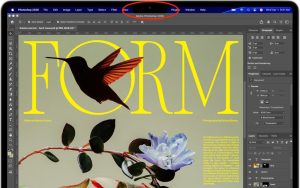
The MacBook Air and MacBook Pro have a notch at the top of the screen that contains the Center Stage camera, camera indicator LED, and True Tone and ambient light sensors. Unfortunately, that notch obscures menu bar icons as they pile up. Utilities such as Bartender and Ice offered solutions, but in macOS 27 Golden Gate, Apple provides a built-in

Read More »
Dealing With the MacBook Notch in macOS 27 Golden Gate
TidBits

Dealing With the MacBook Notch in macOS 27 Golden Gate

The MacBook Air and MacBook Pro have a notch at the top of the screen that contains the Center Stage camera, camera indicator LED, and True Tone and ambient light sensors. Unfortunately, that notch obscures menu bar icons as they pile up. Utilities such as Bartender and Ice offered solutions, but in macOS 27 Golden Gate, Apple provides a built-in

Read More »
Check Rosetta After Upgrading to macOS 27 Golden Gate
TidBits

Check Rosetta After Upgrading to macOS 27 Golden Gate

Has an older app stopped opening after you upgraded to macOS 27 Golden Gate? The missing piece may be Rosetta, Apple’s software that lets Intel-based apps run on Macs with Apple silicon. Even if you installed Rosetta years ago, Apple’s release notes say it isn’t automatically restored after the upgrade. Fortunately, macOS 27 still supports it. With your Mac connected

Read More »
Check Rosetta After Upgrading to macOS 27 Golden Gate
TidBits

Check Rosetta After Upgrading to macOS 27 Golden Gate

Has an older app stopped opening after you upgraded to macOS 27 Golden Gate? The missing piece may be Rosetta, Apple’s software that lets Intel-based apps run on Macs with Apple silicon. Even if you installed Rosetta years ago, Apple’s release notes say it isn’t automatically restored after the upgrade. Fortunately, macOS 27 still supports it. With your Mac connected

Read More »
Keep Your Ringer Quiet and Your Alarms Loud in iOS 27
TidBits

Keep Your Ringer Quiet and Your Alarms Loud in iOS 27

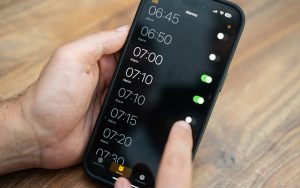
Want a quiet ringtone without making your kitchen timer easy to miss? In iOS 27, you can set alarm and timer volume separately from ringtone volume. By default, they’re still linked, so you’ll need to change a setting. Go to Settings > Sounds & Haptics, find Alarms and Timers, and turn off Match Ringtone Volume. Drag the slider below it

Read More »
Keep Your Ringer Quiet and Your Alarms Loud in iOS 27
TidBits

Keep Your Ringer Quiet and Your Alarms Loud in iOS 27

Want a quiet ringtone without making your kitchen timer easy to miss? In iOS 27, you can set alarm and timer volume separately from ringtone volume. By default, they’re still linked, so you’ll need to change a setting. Go to Settings > Sounds & Haptics, find Alarms and Timers, and turn off Match Ringtone Volume. Drag the slider below it

Read More »
You Quit the App. Why Is It Still Running?
TidBits

You Quit the App. Why Is It Still Running?

Quitting a Mac app doesn’t always stop everything it’s doing. Some apps leave background processes running to sync files, check for updates, or finish other work. In macOS 27 Golden Gate, Apple makes this activity more visible: you’ll see a notification the first time an app continues running after you quit, and hovering over its Dock icon reveals a Running

Read More »
You Quit the App. Why Is It Still Running?
TidBits

You Quit the App. Why Is It Still Running?

Quitting a Mac app doesn’t always stop everything it’s doing. Some apps leave background processes running to sync files, check for updates, or finish other work. In macOS 27 Golden Gate, Apple makes this activity more visible: you’ll see a notification the first time an app continues running after you quit, and hovering over its Dock icon reveals a Running

Read More »